# buttonizer-multifunctional-button/1.5.1/classes/Admin/PageCategories.php

Buttonizer – Floating Menus, Sticky Buttons, &amp; Popup Builder, version 1.5.1. 67 lines.

- Page: https://pluginprobe.com/plugins/buttonizer-multifunctional-button/1.5.1/code/classes/Admin/PageCategories.php
- Raw: https://pluginprobe.com/plugins/buttonizer-multifunctional-button/1.5.1/raw/classes/Admin/PageCategories.php
- Modified: 2018-04-19T12:29:34+00:00

Line numbers below start at 1. Link to a line or a range by appending a fragment to the
page URL, for example `https://pluginprobe.com/plugins/buttonizer-multifunctional-button/1.5.1/code/classes/Admin/PageCategories.php#L10-L20`.

```php
<?php

/*
This program is free software; you can redistribute it and/or
modify it under the terms of the GNU General Public License
as published by the Free Software Foundation; either version 2
of the License, or (at your option) any later version.

This program is distributed in the hope that it will be useful,
but WITHOUT ANY WARRANTY; without even the implied warranty of
MERCHANTABILITY or FITNESS FOR A PARTICULAR PURPOSE.  See the
GNU General Public License for more details.

You should have received a copy of the GNU General Public License
along with this program; if not, write to the Free Software
Foundation, Inc., 51 Franklin Street, Fifth Floor, Boston, MA  02110-1301, USA.

Copyright 2017 Buttonizer
*/
namespace Buttonizer\Admin;

# No script kiddies
defined( 'ABSPATH' ) or die( 'No script kiddies please!' );
class PageCategories
{
    private  $aSavedData = array() ;
    private  $aAllPages = array() ;
    public function __construct()
    {
        $this->loadData();
        $this->loadCategories();
    }
    
    private function loadData()
    {
        $this->aSavedData = (array) get_option( 'buttonizer_page_categories' );
    }
    
    private function loadCategories()
    {
        // Get buttons
        $aCategories = $this->aSavedData;
        echo  '<div id="page-categories">' ;
        // Not removable button row
        echo  '<div class="button-row is_category">
			<div class="row-info">
				<span><i class="fa fa-file-text-o"></i> All pages</span>
				<a href="javascript:void(0)" class="delete-button" style="opacity: 0.5">Delete <i class="fa fa-trash-o"></i></a>
			</div>

			<div class="button-data">
				When a button is set on \'All pages\', the button will shown on all pages. <br />
				<br />
				You cannot edit the \'All pages\' item.
			</div>
		</div>' ;
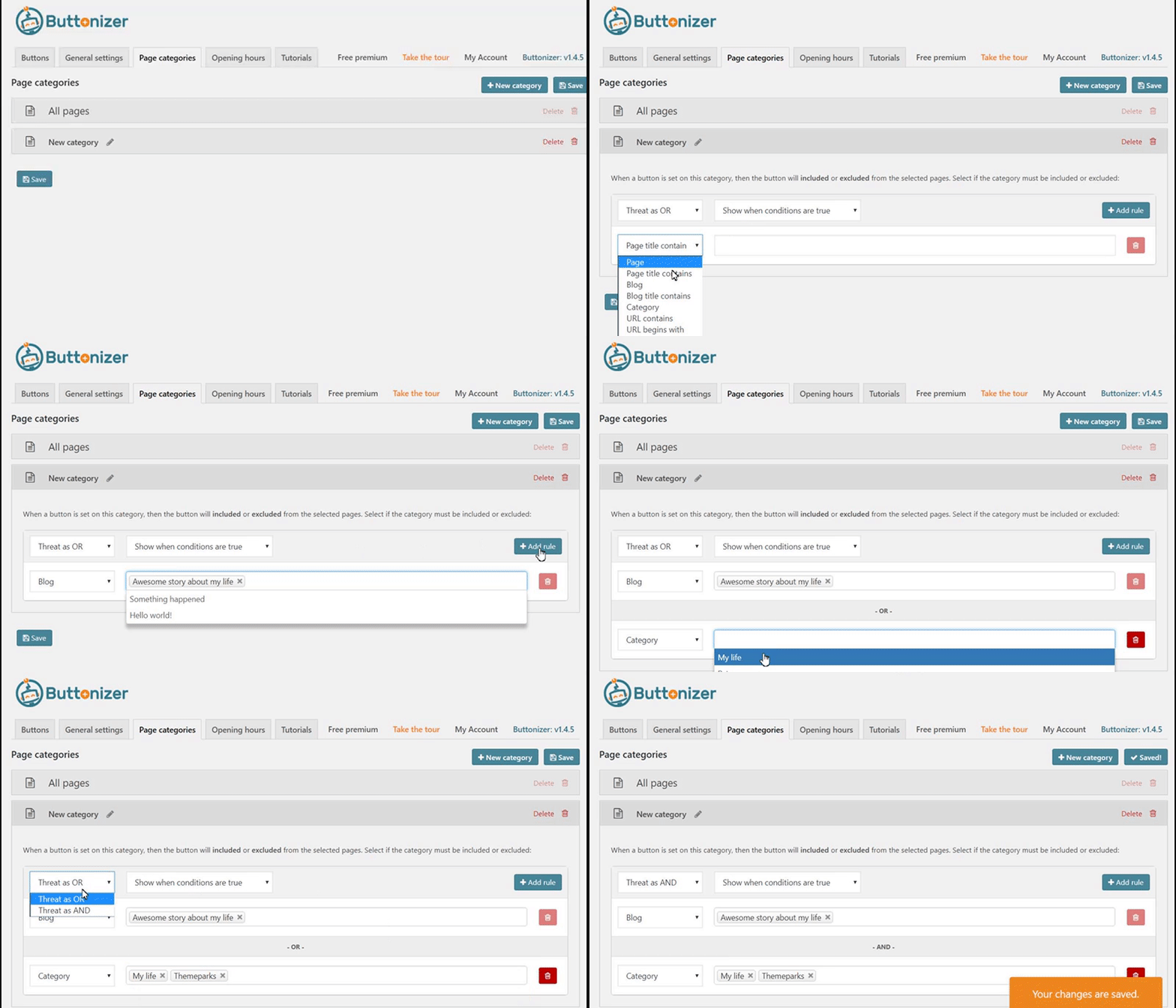
        echo  '<script>jQuery("h2 #new-button").click(buttonizer.proInfoWindow);</script><div class="buttonizer-pro-text" style="text-align: center"><i class="fa fa-lock"></i> You are missing the fun! When upgrading to <a href="admin.php?page=Buttonizer-pricing">Buttonizer Pro</a> you will unlock page rules. Look at an example how it works:</div>' ;
        echo  '<img src="https://i.gyazo.com/a9f311ff026963d7c5d5f5234856d4f1.gif" style="display: block; margin: 0px auto; max-width: 100%;" />' ;
        echo  '</div>' ;
        echo  '<script>buttonizer.categories.initialize(/* READY */);</script>' ;
    }
    
    private function loadIndividialCategoryRow( $iCategoryId, $categoryData )
    {
    }

}
```