| @@ -1,78 +1,60 @@ | ||
| 1 | 1 | # Gutenberg |
| 2 | -[](https://travis-ci.com/WordPress/gutenberg) | |
| 3 | -[](https://lerna.js.org) | |
| 4 | 2 | |
| 5 | -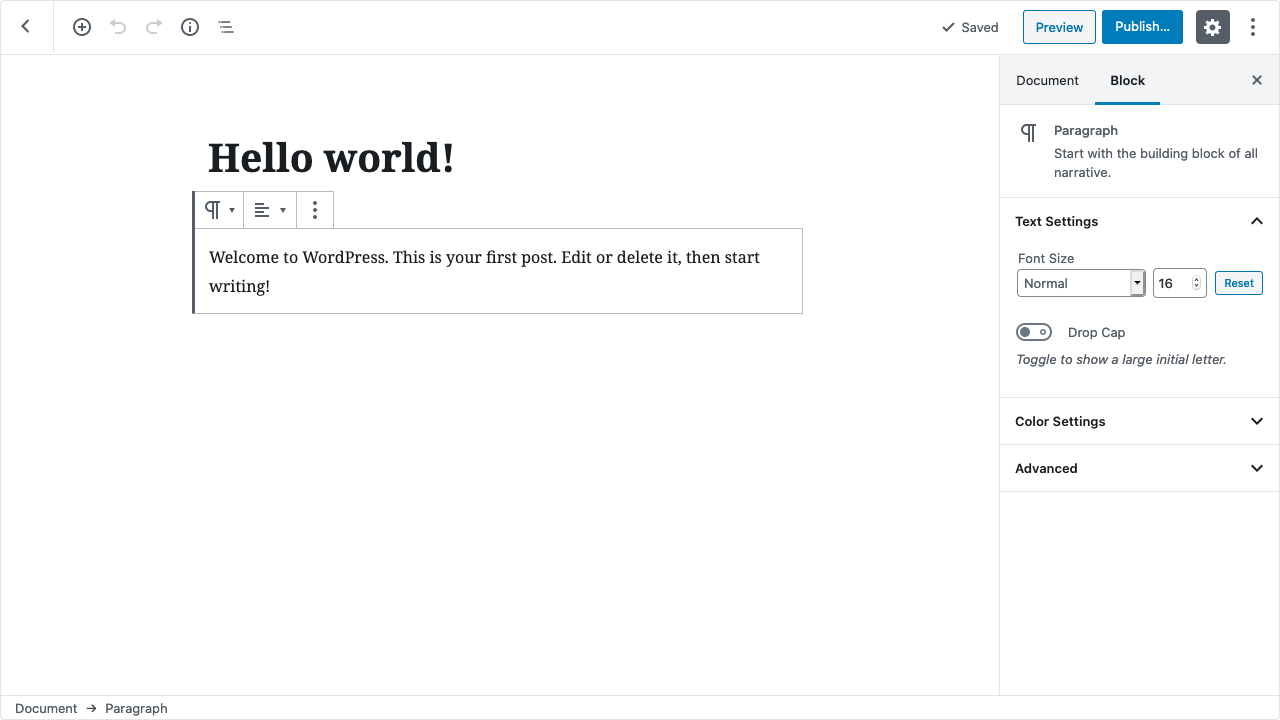 | |
| 3 | +[](https://github.com/WordPress/gutenberg/actions?query=workflow%3A%22End-to-End+Tests%22+branch%3Atrunk) | |
| 4 | +[/badge.svg>)](https://github.com/WordPress/gutenberg/actions?query=workflow%3A%22Static+Analysis+%28Linting%2C+License%2C+Type+checks...%29%22+branch%3Atrunk) | |
| 5 | +[](https://github.com/WordPress/gutenberg/actions?query=workflow%3A%22Unit+Tests%22+branch%3Atrunk) | |
| 6 | +[](https://github.com/WordPress/gutenberg/actions?query=workflow%3A%22Create+Block%22+branch%3Atrunk) | |
| 7 | +[/badge.svg>)](https://github.com/WordPress/gutenberg/actions?query=workflow%3A%22React+Native+E2E+Tests+%28iOS%29%22+branch%3Atrunk) | |
| 8 | +[/badge.svg>)](https://github.com/WordPress/gutenberg/actions?query=workflow%3A%22React+Native+E2E+Tests+%28Android%29%22+branch%3Atrunk) | |
| 6 | 9 | |
| 7 | -This repo is the development hub for the <a href="https://make.wordpress.org/core/2017/01/04/focus-tech-and-design-leads/">editor focus in WordPress Core</a>. `Gutenberg` is the project name. | |
| 10 | +[](https://lerna.js.org) | |
| 8 | 11 | |
| 9 | -## Getting started | |
| 10 | -- **Download:** If you want to use the latest release with your WordPress site, <a href="https://wordpress.org/plugins/gutenberg/">download the latest release from the WordPress.org plugins repository</a>. | |
| 11 | -- **Discuss:** Conversations and discussions take place in <a href="https://wordpress.slack.com/messages/C02QB2JS7">`#core-editor` channel on the Making WordPress Slack</a>. | |
| 12 | -- **Contribute:** Development of Gutenberg happens in this GitHub repo. Get started by <a href="https://github.com/WordPress/gutenberg/blob/master/CONTRIBUTING.md">reading the contributing guidelines</a>. | |
| 13 | -- **Learn:** <a href="https://wordpress.org/gutenberg/">Discover more about the project on WordPress.org</a>. | |
| 12 | + | |
| 14 | 13 | |
| 15 | -**Gutenberg is more than an editor.** While the project is currently focused on building the new editor for WordPress, it doesn't end there. This lays the groundwork for a new model for WordPress Core that will ultimately impact the entire publishing experience of the platform. | |
| 14 | +Welcome to the development hub for the WordPress Gutenberg project! | |
| 16 | 15 | |
| 17 | -## Editing focus | |
| 16 | +"Gutenberg" is a codename for a whole new paradigm in WordPress site building and publishing, that aims to revolutionize the entire publishing experience as much as Gutenberg did the printed word. Right now, the project is in the second phase of a four-phase process that will touch every piece of WordPress -- Editing, **Customization** (which includes Full Site Editing, Block Patterns, Block Directory and Block based themes), Collaboration, and Multilingual -- and is focused on a new editing experience, the block editor. | |
| 18 | 17 | |
| 19 | -> *The editor will create a new page- and post-building experience that makes writing rich posts effortless, and has “blocks” to make it easy what today might take shortcodes, custom HTML, or “mystery meat” embed discovery.* | |
| 20 | -> | |
| 21 | -> — Matt Mullenweg | |
| 18 | +The block editor introduces a modular approach to pages and posts: each piece of content in the editor, from a paragraph to an image gallery to a headline, is its own block. And just like physical blocks, WordPress blocks can be added, arranged, and rearranged, allowing WordPress users to create media-rich pages in a visually intuitive way -- and without work-arounds like shortcodes or custom HTML. | |
| 22 | 19 | |
| 23 | -One thing that sets WordPress apart is that it allows you to create a post layout that's as rich as you can imagine—but only if you can build your own custom theme with HTML and CSS. By thinking of the editor as a tool that allows you to write rich posts **and** create beautiful layouts, we can transform WordPress into something users _love_, as opposed to something they choose because it happens to be what everyone else uses. | |
| 20 | +The block editor first became available in December 2018, and we're still hard at work refining the experience, creating more and better blocks, and laying the groundwork for the next three phases of work. The Gutenberg plugin gives you the latest version of the block editor so you can join us in testing bleeding-edge features, start playing with blocks, and maybe get inspired to build your own. | |
| 24 | 21 | |
| 25 | -**Gutenberg is a new way forward.** It looks at the editor as more than a content field, revisiting a layout that has been largely unchanged for almost a decade. This project allows The WordPress Project to holistically design a modern editing experience and build a foundation for things to come. | |
| 22 | +Check out the [Ways to keep up with Gutenberg & Full Site Editing (FSE)](https://make.wordpress.org/core/2020/05/20/ways-to-keep-up-with-full-site-editing-fse/) | |
| 26 | 23 | |
| 27 | -Here's why we're looking at the whole editing screen, as opposed to just the content field: | |
| 24 | +## Getting Started | |
| 28 | 25 | |
| 29 | -1. **The block unifies multiple interfaces.** If Gutenberg added blocks on top of the existing interface, it would _add_ complexity, as opposed to removing it. | |
| 30 | -2. **Simplified (and enhanced) editing.** By revisiting the interface, Gutenberg can modernize the writing, editing, and publishing experience, with usability and simplicity in mind, benefitting both new and casual users. | |
| 31 | -3. **Better interface usability.** When singular block interface takes center stage, it demonstrates a clear path forward for developers to create premium blocks, superior to both shortcodes and widgets. | |
| 32 | -4. **A fresh look at content creation.** Considering the whole interface lays a solid foundation for the next focus: full site customization. | |
| 33 | -5. **Modern tooling.** Looking at the full editor screen also gives WordPress the opportunity to drastically modernize the foundation, and take steps towards a more fluid and JavaScript-powered future that fully leverages the WordPress REST API. | |
| 26 | +Get hands on: check out the [block editor live demo](https://wordpress.org/gutenberg/) to play with a test instance of the editor. | |
| 34 | 27 | |
| 28 | +### Using Gutenberg | |
| 35 | 29 | |
| 36 | -## Blocks | |
| 30 | +- **Download:** To use the latest release of the Gutenberg plugin on your WordPress site: install from the plugins page in wp-admin, or [download from the WordPress.org plugins repository](https://wordpress.org/plugins/gutenberg/). | |
| 37 | 31 | |
| 38 | -Blocks are the unifying evolution of what is now covered, in different ways, by shortcodes, embeds, widgets, post formats, custom post types, theme options, meta-boxes, and other formatting elements. They embrace the breadth of functionality WordPress is capable of, with the clarity of a consistent user experience. | |
| 32 | +- **User Documentation:** See the [WordPress Editor documentation](https://wordpress.org/support/article/wordpress-editor/) for detailed docs on using the editor as an author creating posts and pages. | |
| 39 | 33 | |
| 40 | -Imagine a custom `employee` block that a client can drag onto an `About` page to automatically display a picture, name, and bio of all the employees. Imagine a whole universe of plugins just as flexible, all extending WordPress in the same way. Imagine simplified menus and widgets. Users who can instantly understand and use WordPress—and 90% of plugins. This will allow you to easily compose beautiful posts like <a href="http://moc.co/sandbox/example-post/">this example</a>. | |
| 34 | +- **User Support:** If you have run into an issue, you should check the [Support Forums first](https://wordpress.org/support/forums/). The forums are a great place to get help. If you have a bug to report, please [submit it to the Gutenberg repository](https://github.com/wordpress/gutenberg/issues). Please search prior to creating a new bug to confirm its not a duplicate. | |
| 41 | 35 | |
| 42 | -Check out the <a href="https://developer.wordpress.org/block-editor/contributors/faq/">FAQ</a> for answers to the most common questions about the project. | |
| 36 | +### Developing for Gutenberg | |
| 43 | 37 | |
| 44 | -## Compatibility | |
| 38 | +Extending and customizing is at the heart of the WordPress platform, this is no different for the Gutenberg project. The editor and future products can be extended by third-party developers using plugins. | |
| 45 | 39 | |
| 46 | -Posts are backward compatible, and shortcodes will still work. We are continuously exploring how highly-tailored meta boxes can be accommodated, and are looking at solutions ranging from a plugin to disable Gutenberg to automatically detecting whether to load Gutenberg or not. While we want to make sure the new editing experience from writing to publishing is user-friendly, we’re committed to finding a good solution for highly-tailored existing sites. | |
| 40 | +Review the [Create a Block tutorial](/docs/getting-started/create-block/README.md) for the fastest way to get started extending the block editor. See the [Developer Documentation](https://developer.wordpress.org/block-editor/#develop-for-the-block-editor) for extensive tutorials, documentation, and API references. | |
| 47 | 41 | |
| 48 | -## The stages of Gutenberg | |
| 42 | +### Contribute to Gutenberg | |
| 49 | 43 | |
| 50 | -Gutenberg has three planned stages. | |
| 51 | -1) **The first, aimed for inclusion in WordPress 5.0, focuses on the post editing experience** and the implementation of blocks. This initial phase focuses on a content-first approach. The use of blocks, as detailed above, allows you to focus on how your content will look without the distraction of other configuration options. This ultimately will help all users present their content in a way that is engaging, direct, and visual. These foundational elements will pave the way forward. | |
| 52 | -2) Planned for 2019, **The second stage focuses on overhauling The Customizer** and page templates. | |
| 53 | -3) Ultimately, **full site customization** will be possible. | |
| 44 | +Gutenberg is an open-source project and welcomes all contributors from code to design, from documentation to triage. The project is built by many contributors and volunteers and we'd love your help building it. | |
| 54 | 45 | |
| 55 | -**Gutenberg is a big change.** There will be ways to ensure that existing functionality (like shortcodes and meta-boxes) continue to work while allowing developers the time and paths to transition effectively. Ultimately, it will open new opportunities for plugin and theme developers to better serve users through a more engaging and visual experience that takes advantage of a toolset supported by core. | |
| 46 | +See the [Contributors Handbook](https://developer.wordpress.org/block-editor/contributors/) for all the details on how you can contribute. See [CONTRIBUTING.md](https://github.com/WordPress/gutenberg/blob/HEAD/CONTRIBUTING.md) for the contributing guidelines. | |
| 56 | 47 | |
| 57 | -## Get involved | |
| 48 | +As with all WordPress projects, we want to ensure a welcoming environment for everyone. With that in mind, all contributors are expected to follow our [Code of Conduct](https://github.com/WordPress/gutenberg/blob/HEAD/CODE_OF_CONDUCT.md). | |
| 58 | 49 | |
| 59 | -We’re calling this editor project "Gutenberg" because it's a big undertaking. We are working on it every day in GitHub, and we'd love your help building it. You’re also welcome to give feedback, the easiest is to join us in <a href="https://make.wordpress.org/chat/">our Slack channel</a>, `#core-editor`. A weekly meeting is held in the Slack channel on Wednesdays at 13:00 UTC. | |
| 50 | +## Get Involved | |
| 60 | 51 | |
| 61 | -## Contributors | |
| 52 | +You can join us in the `#core-editor` channel in Slack, see the [WordPress Slack page](https://make.wordpress.org/chat/) for signup information; it is free to join. | |
| 62 | 53 | |
| 63 | -Gutenberg is built by many contributors and volunteers. Please see the full list in <a href="https://github.com/WordPress/gutenberg/blob/master/CONTRIBUTORS.md">CONTRIBUTORS.md</a>. | |
| 54 | +**Weekly meetings** The Editor Team meets weekly on Wednesdays at 14:00 UTC in Slack. If you can not join the meeting, [agenda](https://make.wordpress.org/core/tag/core-editor-agenda/) and [notes](https://make.wordpress.org/core/tag/core-editor-summary/) are posted to the [Make WordPress Blog](https://make.wordpress.org/core/). | |
| 64 | 55 | |
| 65 | -## How You Can Contribute | |
| 56 | +## License | |
| 66 | 57 | |
| 67 | -Please see <a href="https://github.com/WordPress/gutenberg/blob/master/CONTRIBUTING.md">CONTRIBUTING.md</a>. | |
| 68 | - | |
| 69 | -## Further Reading | |
| 70 | - | |
| 71 | -- <a href="http://matiasventura.com/post/gutenberg-or-the-ship-of-theseus/">Gutenberg, or the Ship of Theseus</a>, with examples of what Gutenberg might do in the future | |
| 72 | -- <a href="https://make.wordpress.org/core/2017/01/17/editor-technical-overview/">Editor Technical Overview</a> | |
| 73 | -- <a href="https://developer.wordpress.org/block-editor/contributors/design/">Design Principles and block design best practices</a> | |
| 74 | -- <a href="https://github.com/Automattic/wp-post-grammar">WP Post Grammar Parser</a> | |
| 75 | -- <a href="https://make.wordpress.org/core/tag/gutenberg/">Development updates on make.wordpress.org</a> | |
| 76 | -- <a href="https://developer.wordpress.org/block-editor/">Documentation: Creating Blocks, Reference, and Guidelines</a> | |
| 58 | +WordPress is free software, and is released under the terms of the GNU General Public License version 2 or (at your option) any later version. See [LICENSE.md](LICENSE.md) for complete license. | |
| 77 | 59 | |
| 78 | 60 | <br/><br/><p align="center"><img src="https://s.w.org/style/images/codeispoetry.png?1" alt="Code is Poetry." /></p> |
