| @@ -1,60 +1,49 @@ | ||
| 1 | 1 | # Gutenberg |
| 2 | - | |
| 3 | -[](https://github.com/WordPress/gutenberg/actions?query=workflow%3A%22End-to-End+Tests%22+branch%3Atrunk) | |
| 4 | -[/badge.svg>)](https://github.com/WordPress/gutenberg/actions?query=workflow%3A%22Static+Analysis+%28Linting%2C+License%2C+Type+checks...%29%22+branch%3Atrunk) | |
| 5 | -[](https://github.com/WordPress/gutenberg/actions?query=workflow%3A%22Unit+Tests%22+branch%3Atrunk) | |
| 6 | -[](https://github.com/WordPress/gutenberg/actions?query=workflow%3A%22Create+Block%22+branch%3Atrunk) | |
| 7 | - | |
| 8 | -<a href="https://wordpress.github.io/gutenberg/" target="_blank"><img src="https://raw.githubusercontent.com/storybooks/brand/master/badge/badge-storybook.svg" alt="Storybook Badge" /></a> | |
| 9 | - | |
| 2 | +[](https://travis-ci.com/WordPress/gutenberg) | |
| 10 | 3 | [](https://lerna.js.org) |
| 11 | 4 | |
| 12 | - | |
| 5 | +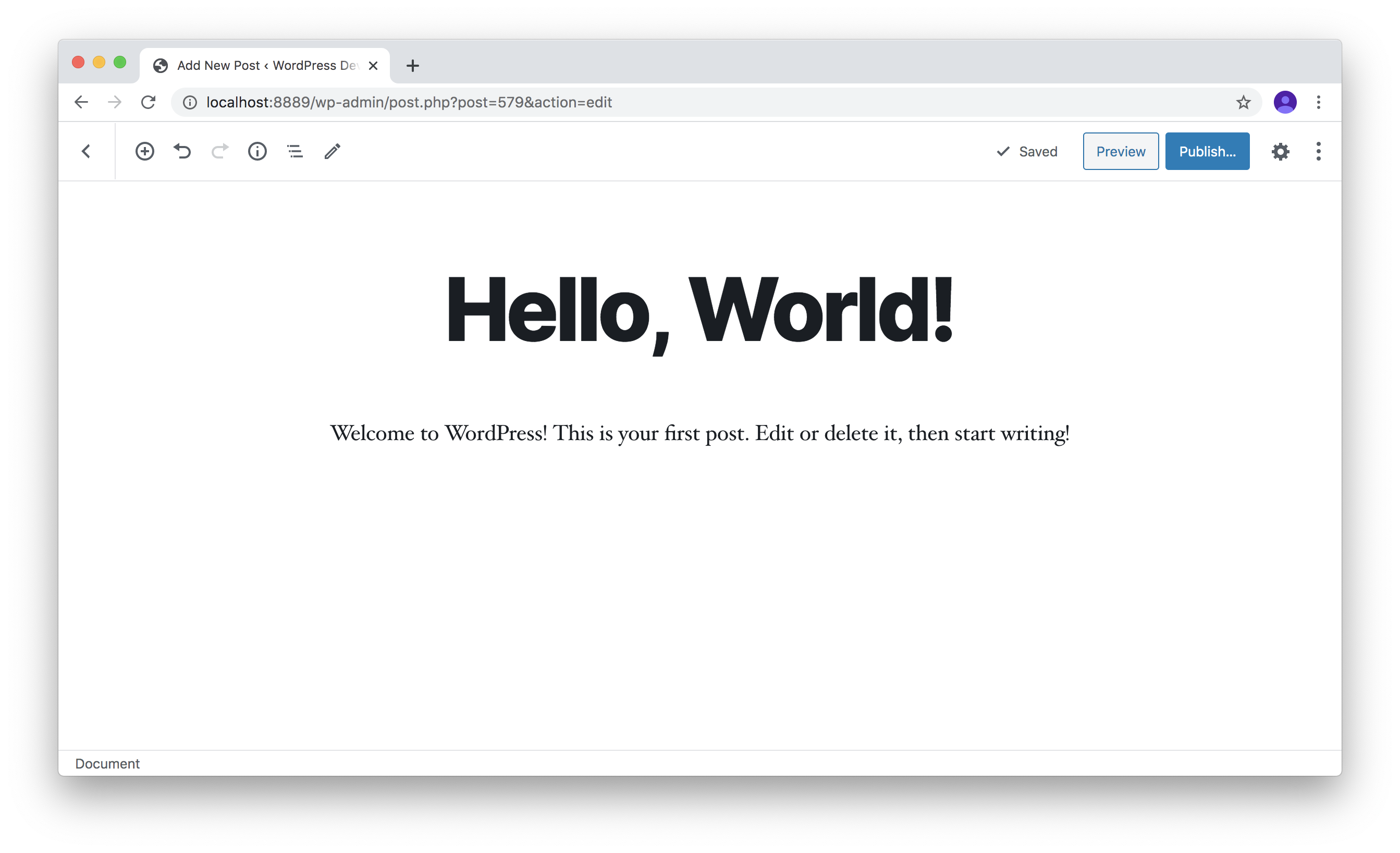 | |
| 13 | 6 | |
| 14 | 7 | Welcome to the development hub for the WordPress Gutenberg project! |
| 15 | 8 | |
| 16 | -"Gutenberg" is a codename for a whole new paradigm in WordPress site building and publishing that aims to revolutionize the entire publishing experience as much as Gutenberg did the printed word. Right now, the project is in the second phase of a four-phase process that will touch every piece of WordPress -- Editing, Customization, **Collaboration** (which includes [Real-time collaboration](https://make.wordpress.org/core/2023/07/03/real-time-collaboration/), [Asynchronous collaboration](https://make.wordpress.org/core/2023/07/04/workflows/), [Publishing flows](https://make.wordpress.org/core/2023/07/04/workflows/), [Post revisions interface](https://make.wordpress.org/core/2023/07/05/revisions/), [Admin design](https://make.wordpress.org/core/2023/07/12/admin-design/), [Library](https://make.wordpress.org/core/2023/07/10/block-library/)), and Multilingual -- and is focused on a new editing experience, the block editor. | |
| 9 | +"Gutenberg" is a codename for a whole new paradigm in WordPress site building and publishing, that aims to revolutionize the entire publishing experience as much as Gutenberg did the printed word. Right now, the project is in the first phase of a four-phase process that will touch every piece of WordPress -- Editing, Customization, Collaboration, and Multilingual -- and is focused on a new editing experience, the block editor. | |
| 17 | 10 | |
| 18 | -The block editor introduces a modular approach to pages and posts: each piece of content in the editor, from a paragraph to an image gallery to a headline, is its own block. And just like physical blocks, WordPress blocks can be added, arranged, and rearranged, allowing WordPress users to create media-rich pages in a visually intuitive way -- and without workarounds like shortcodes or custom HTML. | |
| 11 | +The block editor introduces a modular approach to pages and posts: each piece of content in the editor, from a paragraph to an image gallery to a headline, is its own block. And just like physical blocks, WordPress blocks can added, arranged, and rearranged, allowing WordPress users to create media-rich pages in a visually intuitive way -- and without work-arounds like shortcodes or custom HTML. | |
| 19 | 12 | |
| 20 | -The block editor first became available in December 2018, and we're still hard at work refining the experience, creating more and better blocks, and laying the groundwork for the next three phases of work. The Gutenberg plugin gives you the latest version of the block editor, so you can join us in testing bleeding-edge features, start playing with blocks, and maybe get inspired to build your own. | |
| 13 | +The block editor first became available in December 2018, and we're still hard at work refining the experience, creating more and better blocks, and laying the groundwork for the next three phases of work. The Gutenberg plugin gives you the latest version of the block editor so you can join us in testing bleeding-edge features, start playing with blocks, and maybe get inspired to build your own. | |
| 21 | 14 | |
| 22 | -Check out the [Keeping up with Gutenberg Index](https://make.wordpress.org/core/handbook/references/keeping-up-with-gutenberg-index/). | |
| 23 | - | |
| 24 | 15 | ## Getting Started |
| 25 | 16 | |
| 26 | -Get hands-on: check out the [block editor live demo](https://wordpress.org/gutenberg/) to play with a test instance of the editor. | |
| 17 | +Get hands on: check out the [block editor live demo](https://wordpress.org/gutenberg/) to play with a test instance of the editor. | |
| 27 | 18 | |
| 28 | 19 | ### Using Gutenberg |
| 29 | 20 | |
| 30 | -- **Download:** To use the latest release of the Gutenberg plugin on your WordPress site: install from the plugins page in wp-admin, or [download from the WordPress.org plugins repository](https://wordpress.org/plugins/gutenberg/). | |
| 21 | +- **Download:** To use the latest release of the Gutenberg plugin on your WordPress site: install from the plugins page in wp-admin, or [download from the WordPress.org plugins repository](https://wordpress.org/plugins/gutenberg/). | |
| 31 | 22 | |
| 32 | -- **User Documentation:** See the [WordPress Editor documentation](https://wordpress.org/documentation/article/wordpress-block-editor/) for detailed docs on using the editor as an author creating posts and pages. | |
| 23 | +- **User Documentation:** See the [WordPress Editor documentation](https://wordpress.org/support/article/wordpress-editor/) for detailed docs on using the editor as an author creating posts and pages. | |
| 33 | 24 | |
| 34 | -- **User Support:** If you have run into an issue, you should check the [Support Forums first](https://wordpress.org/support/forums/). The forums are a great place to get help. If you have a bug to report, please [submit it to the Gutenberg repository](https://github.com/wordpress/gutenberg/issues). Please search prior to creating a new bug to confirm it's not a duplicate. | |
| 25 | +- **User Support:** If you have run into an issue, you should check the [Support Forums first](https://wordpress.org/support/forums/). The forums are a great place to get help. If you have a bug to report, please [submit it to the Gutenberg repository](https://github.com/wordpress/gutenberg/issues). Please search prior to creating a new bug to confirm its not a duplicate. | |
| 35 | 26 | |
| 36 | 27 | ### Developing for Gutenberg |
| 37 | 28 | |
| 38 | 29 | Extending and customizing is at the heart of the WordPress platform, this is no different for the Gutenberg project. The editor and future products can be extended by third-party developers using plugins. |
| 39 | 30 | |
| 40 | -Review the [Quick Start Guide](https://developer.wordpress.org/block-editor/getting-started/quick-start-guide/) for the fastest way to get started extending the block editor. See the [Block Editor Handbook](https://developer.wordpress.org/block-editor/) for extensive tutorials, documentation, and API references. Also, check the [WordPress Developer Blog](https://developer.wordpress.org/blog/) for great articles about block development, among other topics. | |
| 31 | +The <a href="/docs/contributors/getting-started.md">Getting Started guide</a> will help you run Gutenberg locally to tinker with. See the [Developer Documentation](https://developer.wordpress.org/block-editor/developers/) for extensive tutorials, documentation, and API references on how to extend the editor. | |
| 41 | 32 | |
| 42 | 33 | ### Contribute to Gutenberg |
| 43 | 34 | |
| 44 | -Gutenberg is an open-source project and welcomes all contributors from code to design, and from documentation to triage. The project is built by many contributors and volunteers, and we'd love your help building it. | |
| 35 | +Gutenberg is an open-source project and welcomes all contributors from code to design, from documentation to triage. The project is built by many [contributors and volunteers](https://github.com/WordPress/gutenberg/blob/master/CONTRIBUTORS.md) and we'd love your help building it. | |
| 45 | 36 | |
| 46 | -See the [Contributors Handbook](https://developer.wordpress.org/block-editor/contributors/) for all the details on how you can contribute. | |
| 37 | +See the [Contributors Handbook](https://developer.wordpress.org/block-editor/contributors/) for all the details on how you can contribute. See [CONTRIBUTING.md](https://github.com/WordPress/gutenberg/blob/master/CONTRIBUTING.md) for the contributing guidelines. | |
| 47 | 38 | |
| 48 | -To get up and running quickly with **code contribution**, see [Getting Started With Code Contribution](/docs/contributors/code/getting-started-with-code-contribution.md). Also check out the other resources available on the [Code Contributions](/docs/contributors/code/README.md) page. | |
| 39 | +As with all WordPress projects, we want to ensure a welcoming environment for everyone. With that in mind, all contributors are expected to follow our [Code of Conduct](https://github.com/WordPress/gutenberg/blob/master/CODE_OF_CONDUCT.md). | |
| 49 | 40 | |
| 50 | -In whichever way you wish to contribute, please be sure to read the [Contributing Guidelines](https://github.com/WordPress/gutenberg/blob/HEAD/CONTRIBUTING.md) first. | |
| 51 | - | |
| 52 | -As with all WordPress projects, we want to ensure a welcoming environment for everyone. With that in mind, all contributors are expected to follow our [Code of Conduct](https://make.wordpress.org/handbook/community-code-of-conduct/). | |
| 53 | - | |
| 54 | 41 | ## Get Involved |
| 55 | 42 | |
| 56 | 43 | You can join us in the `#core-editor` channel in Slack, see the [WordPress Slack page](https://make.wordpress.org/chat/) for signup information; it is free to join. |
| 44 | + | |
| 45 | +**Weekly meetings** The Editor Team meets weekly on Wednesdays at 14:00 UTC in Slack. If you can not join the meeting, agenda and notes are posted to the [Make WordPress Blog](https://make.wordpress.org/core/). | |
| 57 | 46 | |
| 58 | 47 | ## License |
| 59 | 48 | |
| 60 | 49 | WordPress is free software, and is released under the terms of the GNU General Public License version 2 or (at your option) any later version. See [LICENSE.md](LICENSE.md) for complete license. |
