| 1 |
<p align="center"><a href='https://www.omise.co'><img src='https://cloud.githubusercontent.com/assets/2154669/26388730/437207e4-4080-11e7-9955-2cd36bb3120f.png' height='160'></a></p> |
| 2 |
|
| 3 |
**Omise WooCommerce** is the official payment extension which provides support for Omise payment gateway for store builders working on the WooCommerce platform. |
| 4 |
|
| 5 |
## Supported Versions |
| 6 |
|
| 7 |
WooCommerce version 3.3.4 and above (tested to version 3.7.1). |
| 8 |
|
| 9 |
**The extension doesn't work on your version?** |
| 10 |
Our aim is to support as many versions of WooCommerce as we can. |
| 11 |
If the version you are currently using has not been listed, you can try installing it and report any issues to us at [](https://github.com/omise/omise-woocommerce/issuesGitHub's issue channel](https://github.com/omise/omise-woocommerce/issues](https://github.com/omise/omise-woocommerce/issues) by following the [](https://guides.github.com/activities/contributing-to-open-source/#contributingReporting the issue Guideline](https://guides.github.com/activities/contributing-to-open-source/#contributing](https://guides.github.com/activities/contributing-to-open-source/#contributing). |
| 12 |
|
| 13 |
## Getting Started |
| 14 |
|
| 15 |
- [](https://github.com/omise/omise-woocommerce/tree/improve-readme#installation-instructionsInstallation Instructions](https://github.com/omise/omise-woocommerce/tree/improve-readme#installation-instructions](https://github.com/omise/omise-woocommerce/tree/improve-readme#installation-instructions) |
| 16 |
- [](https://github.com/omise/omise-woocommerce/tree/improve-readme#manuallyManually](https://github.com/omise/omise-woocommerce/tree/improve-readme#manually](https://github.com/omise/omise-woocommerce/tree/improve-readme#manually) |
| 17 |
- [](https://github.com/omise/omise-woocommerce/tree/improve-readme#first-time-setupFirst Time Setup](https://github.com/omise/omise-woocommerce/tree/improve-readme#first-time-setup](https://github.com/omise/omise-woocommerce/tree/improve-readme#first-time-setup) |
| 18 |
- [](https://github.com/omise/omise-woocommerce/tree/improve-readme#connect-your-store-with-your-omise-accountConnect your store with your Omise account](https://github.com/omise/omise-woocommerce/tree/improve-readme#connect-your-store-with-your-omise-account](https://github.com/omise/omise-woocommerce/tree/improve-readme#connect-your-store-with-your-omise-account) |
| 19 |
- [](https://github.com/omise/omise-woocommerce/tree/improve-readme#enable-payment-methodsEnable payment methods](https://github.com/omise/omise-woocommerce/tree/improve-readme#enable-payment-methods](https://github.com/omise/omise-woocommerce/tree/improve-readme#enable-payment-methods) |
| 20 |
|
| 21 |
... |
| 22 |
|
| 23 |
### Installation Instructions |
| 24 |
|
| 25 |
In order to install Omise-WooCommerce plugin, you can either manually download the plugin from this repository and install it or download it via WordPress Plugin Store. |
| 26 |
|
| 27 |
#### Manually |
| 28 |
|
| 29 |
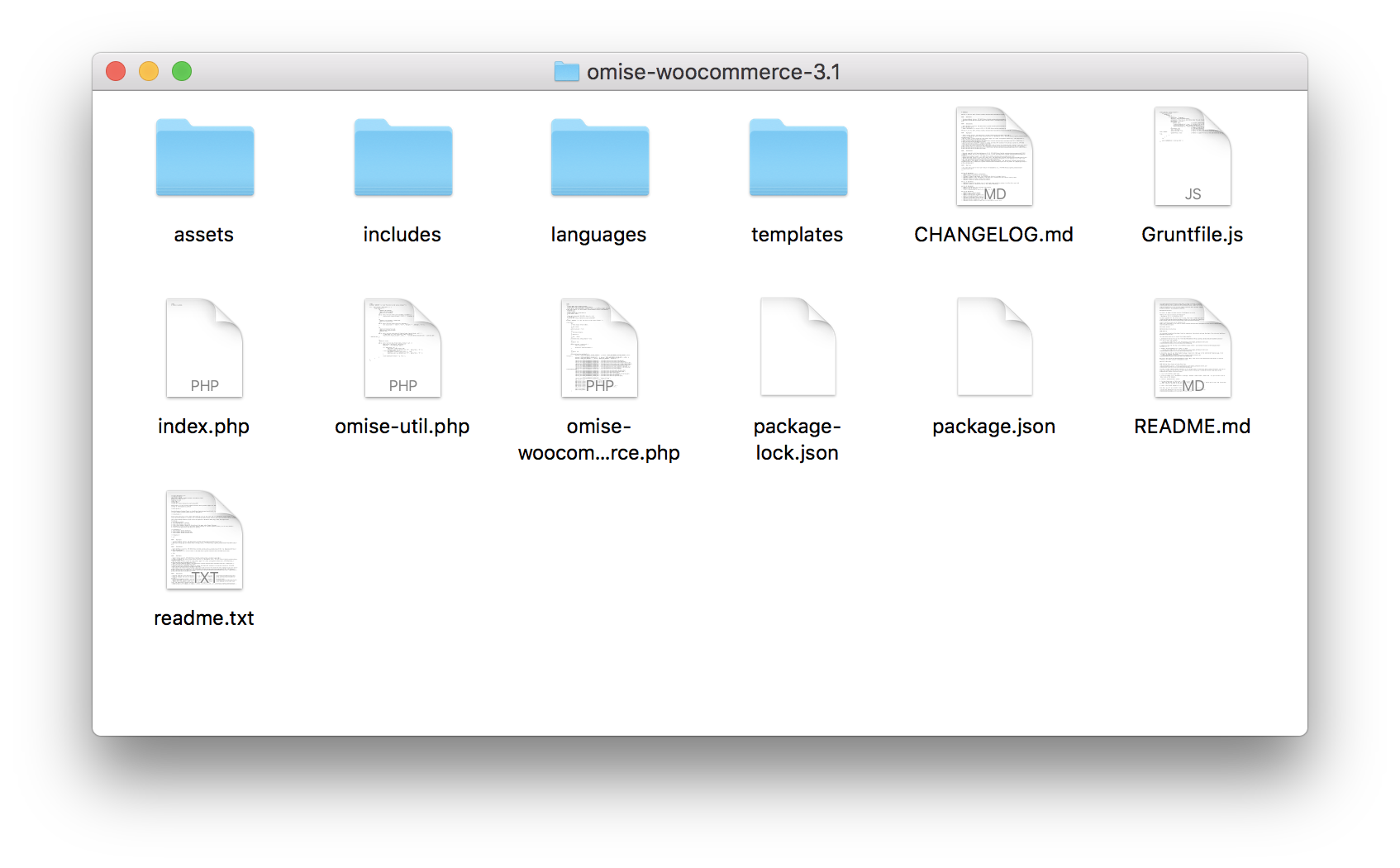
1. Download and extract the zip file from [](https://github.com/omise/omise-woocommerce/archive/v3.9.zipOmise-WooCommerce](https://github.com/omise/omise-woocommerce/archive/v3.9.zip](https://github.com/omise/omise-woocommerce/archive/v3.9.zip) to your local machine. |
| 30 |
 |
| 31 |
|
| 32 |
2. Copy all files from the step 1 to WordPress plugin folder, `your-wordpress-dir/wp-content/plugins/omise-woocommerce-3.9`. |
| 33 |
|
| 34 |
3. Rename `omise-woocommerce-3.9` folder to `omise` |
| 35 |
 |
| 36 |
|
| 37 |
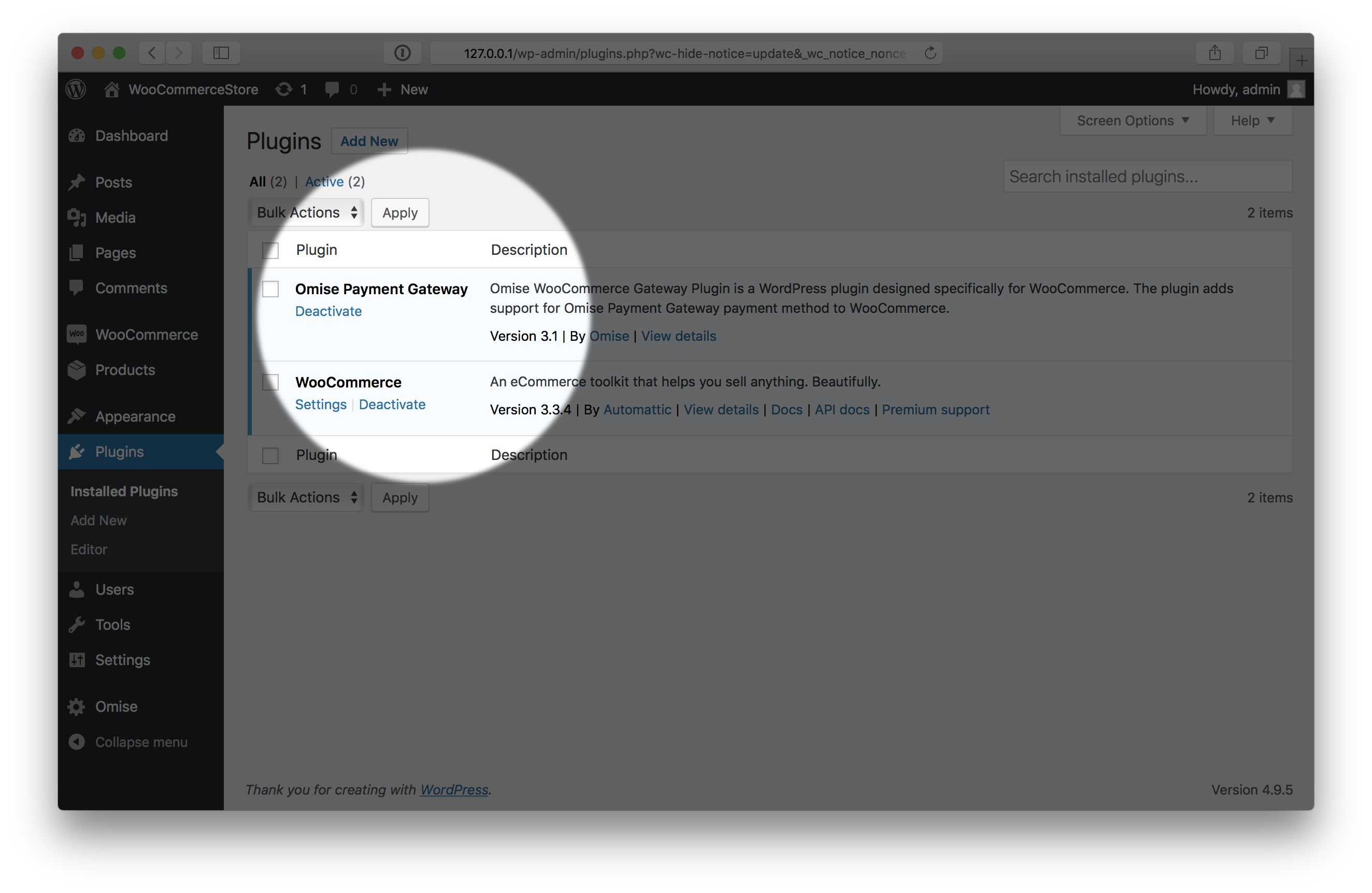
4. Once done, `Omise Payment Gateway` plugin will be shown at the **Installed Plugins** page. Click `activate` to activate the plugin. |
| 38 |
 |
| 39 |
|
| 40 |
Now you've done installing Omise-WooCommerce plugin. |
| 41 |
Next, check **[](#first-time-setupFirst Time Setup](#first-time-setup](#first-time-setup)** to continue setting up your Omise account with your WooCommerce store. |
| 42 |
|
| 43 |
### First Time Setup |
| 44 |
|
| 45 |
#### Connect your store with your Omise account |
| 46 |
|
| 47 |
 |
| 48 |
|
| 49 |
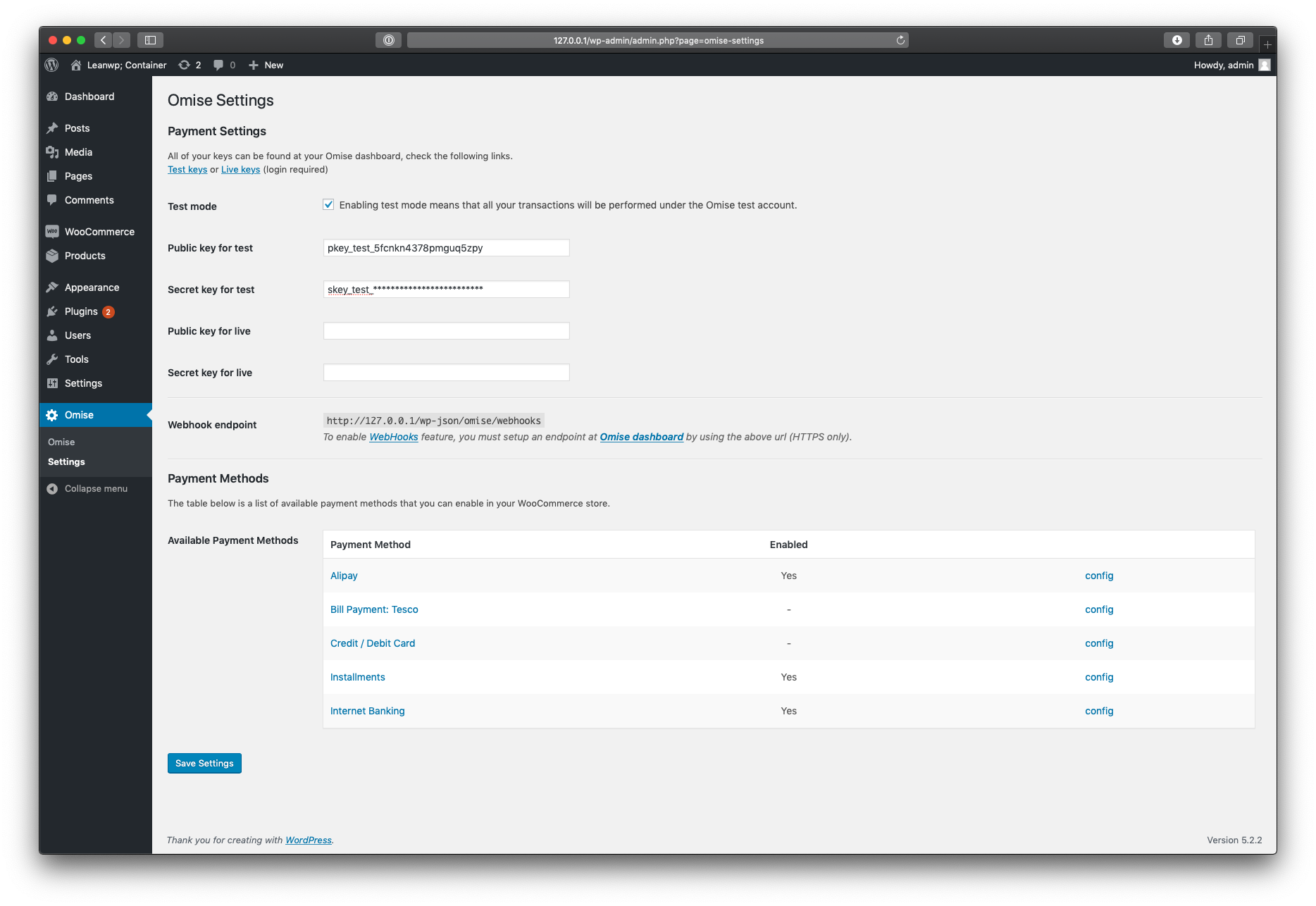
Once the installation is done, the next thing that you are going to do is to connect your store with your Omise account and enable payment methods so your customers can make a purchase with an online payment. |
| 50 |
|
| 51 |
1. Log in to WordPress admin page. |
| 52 |
|
| 53 |
2. From the sidebar, go to `Omise > Settings`. |
| 54 |
|
| 55 |
3. At the Omise Settings page, you are going to set your `Public key` and `Secret key` (these keys can be found at Omise Dashboard). |
| 56 |
|
| 57 |
4. Make sure that the option `Test mode` is checked and set your Omise keys at `Public key for test` and `Secret key for test` fields if you would like to test Omise service integration. |
| 58 |
|
| 59 |
5. Click **'Save Settings'**. |
| 60 |
|
| 61 |
#### Enable payment methods |
| 62 |
|
| 63 |
> Note that Alipay, Bill Payment: Tesco, Installment, and Internet Banking payment methods are only available for merchants with a Thai-registered Omise account. |
| 64 |
|
| 65 |
There are 5 payment methods that you can enable on your store, which are **Alipay**, **Bill Payment: Tesco**, **Credit / Debit Card**, **Installment**, and **Internet Banking**. |
| 66 |
|
| 67 |
1. At Omise Settings page, Payment Methods section, there will be 5 available payment methods show on the list. |
| 68 |
|
| 69 |
2. Click `config` at the table on a payment method that you would like to accept payment with. |
| 70 |
|
| 71 |
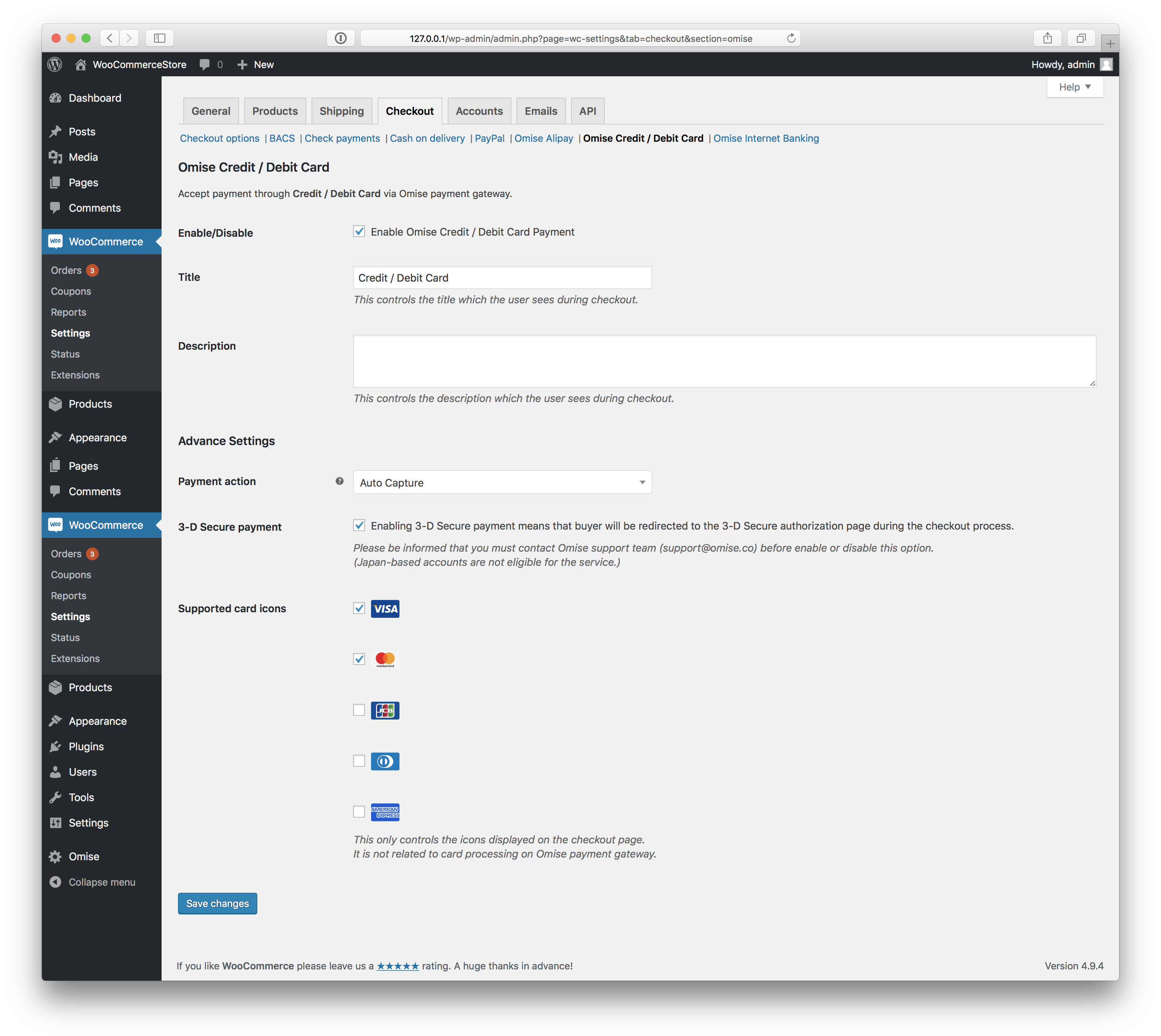
3. You will see a configuration page differently depends on which payment method you are choosing. The screenshot below shows Credit / Debit Card payment method's configuration page. |
| 72 |
 |
| 73 |
|
| 74 |
4. At the configuration page, mark **Enable/Disable** as checked. |
| 75 |
|
| 76 |
5. You may change or update other options in this configuration page (optional). |
| 77 |
|
| 78 |
5. Click **'Save changes'**. |
| 79 |
|
| 80 |
Once done, those payment methods will be shown at the store's checkout page. |
| 81 |
 |
| 82 |
|
| 83 |
... |
| 84 |
|
| 85 |
### What's Next? |
| 86 |
|
| 87 |
Want to know more detail on how to create a charge, refund, and using the plugin? |
| 88 |
Please check [](https://github.com/omise/omise-woocommerce/wikiOmise-WooCommerce's Wiki](https://github.com/omise/omise-woocommerce/wiki](https://github.com/omise/omise-woocommerce/wiki). |
| 89 |
|
| 90 |
## Contributing |
| 91 |
|
| 92 |
Thanks for your interest in contributing to Omise WooCommerce. We're looking forward to hearing your thoughts and willing to review your changes. |
| 93 |
|
| 94 |
The following subjects are instructions for contributors who consider to submit changes and/or issues. |
| 95 |
|
| 96 |
### Submit the changes |
| 97 |
|
| 98 |
You're all welcome to submit a pull request. |
| 99 |
Please consider the [](https://github.com/omise/omise-woocommerce/blob/master/.github/PULL_REQUEST_TEMPLATE.mdpull request template](https://github.com/omise/omise-woocommerce/blob/master/.github/PULL_REQUEST_TEMPLATE.md](https://github.com/omise/omise-woocommerce/blob/master/.github/PULL_REQUEST_TEMPLATE.md) and fill the form when you submit a new pull request. |
| 100 |
|
| 101 |
Learn more about submitting pull request here: [](https://help.github.com/articles/about-pull-requestshttps://help.github.com/articles/about-pull-requests](https://help.github.com/articles/about-pull-requests](https://help.github.com/articles/about-pull-requests) |
| 102 |
|
| 103 |
### Submit the issue |
| 104 |
|
| 105 |
Submit the issue through [](https://github.com/omise/omise-woocommerce/issuesGitHub's issue channel](https://github.com/omise/omise-woocommerce/issues](https://github.com/omise/omise-woocommerce/issues). |
| 106 |
|
| 107 |
Learn more about submitting an issue here: [](https://guides.github.com/features/issueshttps://guides.github.com/features/issues](https://guides.github.com/features/issues](https://guides.github.com/features/issues) |
| 108 |
|
| 109 |
## License |
| 110 |
|
| 111 |
Omise-WooCommerce is open-sourced software released under the [](https://opensource.org/licenses/MITMIT License](https://opensource.org/licenses/MIT](https://opensource.org/licenses/MIT). |
| 112 |
|
